

How to Choose the Best Budget CO2 Laser Engraver Without Sacrificing Performance

Buying a CO2 laser engraver is an important investment for anyone starting a customization business or expanding an existing workshop. However, finding an affordable machine that can handle real production requirements is not always straightforward. A low purchase price may seem attractive, but limited working space, inconsistent engraving results, and frequent maintenance can create additional costs over time.
The challenge is not simply finding the cheapest machine. It is finding equipment that matches your materials, production volume, and available budget without paying for capabilities you do not need.
Whether you produce personalized gifts, wooden decorations, acrylic signs, or custom promotional products, understanding the differences between entry-level and professional CO2 laser systems can help you make a more informed decision.
Why the Cheapest CO2 Laser Engraver Is Not Always the Best Choice
Price is an important consideration, especially for beginners and small businesses. However, the initial purchase price does not necessarily reflect the total cost of operating a laser engraver.
A machine with limited capabilities may require additional manual work, repeated adjustments, or smaller production batches. These limitations can affect how many orders you complete each day.
For example, consider a small business producing personalized wooden signs. A compact machine may be sufficient for individual orders, but processing multiple designs in one session could become difficult if the working area is too small.
Before purchasing, consider three important factors:
- Production efficiency: Can the machine complete your typical jobs within an acceptable timeframe?
- Material compatibility: Does it support the materials and thicknesses required for your products?
- Operating expenses: Are maintenance, replacement parts, ventilation, and other operating requirements manageable?
A budget-friendly CO2 laser engraver should provide practical capabilities for your current workload while allowing some flexibility as your business develops.
5 Factors to Consider When Buying a Budget CO2 Laser Engraver 1. Laser Power Should Match Your Applications
Laser power is one of the first specifications buyers compare. However, choosing the highest wattage available is not necessarily the best approach.
Different applications require different levels of laser output.
For example, engraving names, logos, and decorative patterns on suitable materials may not require the same power as cutting thicker wood or acrylic sheets.
As a general purchasing reference:
- 40W–60W: Worth considering for light engraving, personalized crafts, and smaller workshop applications.
- 60W–100W: A practical range to investigate for businesses handling a wider variety of engraving and cutting projects.
- Higher-power systems: May be more appropriate for demanding cutting applications and heavier production workloads.
These ranges are not universal performance guarantees. Actual results depend on the laser tube, optics, material properties, machine configuration, and operating settings.
Buyers should also distinguish between engraving and cutting requirements. If most of your work involves detailed surface designs, prioritizing engraving quality and motion accuracy may be more useful than purchasing a machine with unnecessarily high power.
Laser equipment also requires appropriate safety considerations. The U.S. Food and Drug Administration (FDA) guide to laser products and instruments explains laser hazard classifications and the importance of managing exposure risks. Buyers should consider the machine’s protective enclosure, safety features, and applicable regulations rather than evaluating wattage alone.
2. Working Area Determines Production Flexibility
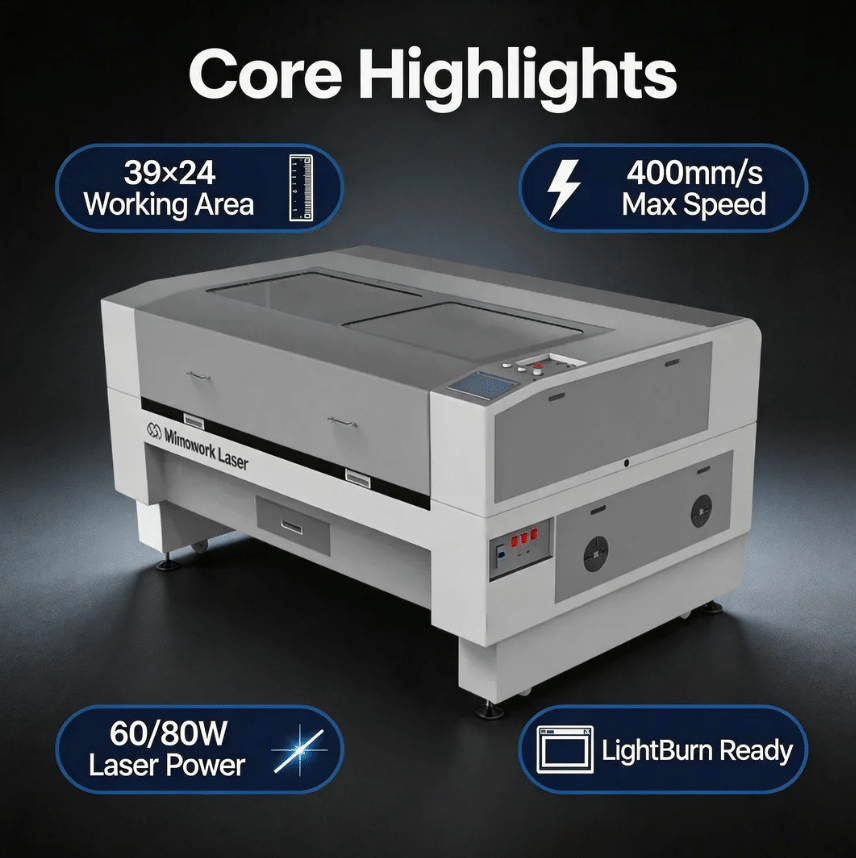
The working area affects the dimensions of the materials you can process and how efficiently you can arrange multiple projects on the machine bed.
A compact machine may be suitable for personalized gifts, small decorations, and individual craft projects. However, businesses producing larger signs or multiple items in batches may benefit from a larger working area.
Consider the following examples:
| Business Application | Working Area Consideration |
| Personalized gifts | Compact workspace may be sufficient |
| Small wooden decorations | Consider space for multiple pieces |
| Acrylic signage | Match the bed to common sheet dimensions |
| Batch production | Allow room for arranging multiple designs |
A larger working area does not automatically mean better productivity. If your products are consistently small, purchasing a significantly larger machine may increase your initial investment without providing meaningful benefits.
The best approach is to measure your commonly used materials and evaluate your expected production volume before deciding.
3. Software Compatibility and Ease of Operation Matter
A laser engraver is only as practical as the workflow supporting it.
Before purchasing, check which design formats and software programs the machine supports. Consider whether the operating system is compatible with your existing computer and whether the software allows you to adjust engraving parameters conveniently.
For new users, an intuitive operating process can reduce the time spent learning the equipment.
Important considerations include:
- Compatibility with commonly used design files.
- Clear controls for speed and power settings.
- Convenient positioning and preview functions.
- Accessible operating instructions and technical documentation.
- Availability of software updates and troubleshooting assistance.
For small businesses, an efficient workflow is particularly valuable. Spending less time preparing files and adjusting settings leaves more time for product development and customer orders.
4. Cooling and Exhaust Systems Should Not Be Overlooked
Cooling and ventilation are essential considerations when evaluating a CO2 laser engraver.
Laser tubes generate heat during operation, making an appropriate cooling arrangement important for maintaining stable operating conditions. Buyers should check the manufacturer’s recommended cooling requirements and whether the necessary equipment is included.
Ventilation is equally important.
Engraving and cutting can produce smoke, particles, and material-dependent fumes. An appropriate exhaust system helps remove these byproducts from the working area.
The Occupational Safety and Health Administration (OSHA) Technical Manual discusses industrial hygiene considerations, including adequate ventilation for controlling potentially hazardous fumes and vapors generated during laser processing.
When comparing affordable machines, check whether cooling and exhaust equipment are included or require separate purchases. These additional requirements should be included in your total equipment budget.
5. Machine Stability and After-Sales Support Affect Long-Term Value
A low-cost machine may become expensive if it frequently interrupts production.
For commercial users, equipment reliability influences delivery schedules, material consumption, and the ability to accept new orders.
Before making a purchase, investigate the following:
- Frame construction and mechanical stability.
- Availability of replacement laser tubes and optical components.
- Manufacturer warranty and service arrangements.
- Technical support and troubleshooting resources.
- Maintenance requirements and operating instructions.
It is also worth asking how easily commonly replaced components can be accessed. A machine that is difficult to maintain may create unnecessary downtime, particularly for workshops without dedicated technical staff.
Safety should also be part of the purchasing decision. The MIT Environmental Health & Safety Laser Cutter Safety Guidance provides practical information about equipment selection, protective enclosures, exhaust requirements, operator training, maintenance, and fire prevention.
These considerations are relevant to both laser cutters and engravers, making the guidance useful when evaluating equipment for a small workshop.
What Materials Can a CO2 Laser Engraver Process?
Material compatibility is another major reason businesses consider CO2 laser systems.
Depending on machine configuration and material properties, CO2 lasers can support engraving and cutting applications across several non-metallic materials.
Wood
Wood is commonly used for personalized gifts, decorative signs, plaques, and home accessories. Laser engraving can create detailed patterns, text, and logos without relying on traditional hand-carving methods.
Acrylic
Acrylic is popular for business signs, display products, awards, and decorative items. CO2 laser processing can produce detailed engraved designs and, with suitable settings, clean cut edges.
Leather
Leather products offer opportunities for customized wallets, accessories, labels, and decorative patterns. Laser engraving can reproduce intricate designs and personalized details.
Fabric
Certain fabrics can be processed using appropriately configured CO2 laser systems. Applications include decorative patterns, textile details, and customized accessories. Material compatibility should always be checked before processing.
Not every material is suitable for laser processing. Some plastics, particularly PVC-containing materials, can release hazardous corrosive gases when heated. Always verify material composition and consult the equipment manufacturer’s safety guidance before processing unfamiliar materials.
CO2 Laser Engraver vs. Diode Laser: Which Is Better for Your Budget?
Buyers comparing affordable laser machines often encounter both CO2 and diode systems.
Although both technologies can produce engraved designs, they differ in wavelength, material compatibility, and typical applications.
| Comparison | CO2 Laser | Diode Laser |
| Laser source | Gas laser tube | Semiconductor diode |
| Common applications | Wood, acrylic, leather, and selected fabrics | Wood, coated materials, and selected other substrates |
| Acrylic processing | Suitable for many acrylic applications | Transparent acrylic is generally challenging |
| Machine configurations | Desktop to industrial systems | Commonly compact desktop systems |
| Purchasing considerations | Tube, cooling, exhaust, and machine size | Laser module, motion system, and enclosure |
Neither technology is automatically the better investment.
A diode laser may be sufficient for hobbyists focusing primarily on simple engraving projects. However, businesses working with acrylic, varied materials, or more demanding production requirements may find a CO2 system more suitable.
The right decision depends on what you intend to produce rather than the technology’s purchase price alone.
How Can a CO2 Laser Engraver Support a Small Business?
For small businesses, a laser engraver can provide more than a convenient production method. It can create opportunities to offer customized products without relying entirely on manual craftsmanship.
Expand Your Product Range
A workshop initially producing wooden gifts may later introduce acrylic decorations, personalized accessories, or promotional products.
Having a machine that supports multiple suitable materials makes it easier to explore new product categories without purchasing separate equipment for every application.
Handle Custom Orders More Efficiently
Personalization is a common requirement in the gift, decoration, and promotional product markets.
With digital design files, businesses can reproduce logos, names, patterns, and other customized details across different orders. This makes repeat production easier to organize.
Improve Batch Production
A suitable working area allows operators to arrange multiple designs within one production session. This can reduce repeated material positioning and make better use of available workspace.
However, actual productivity depends on engraving speed, design complexity, material preparation, and operator experience.
When Should You Upgrade to a More Capable Laser Engraver?
An entry-level machine can be a reasonable starting point, but growing businesses may eventually encounter production limitations.
Several signs suggest that an upgrade deserves consideration:
- Your typical product dimensions exceed the available working area.
- You regularly need to process more items per batch.
- Your existing machine cannot meet the requirements of new applications.
- Production interruptions are affecting delivery schedules.
- Your order volume has increased beyond the machine’s practical capacity.
For example, a small workshop producing individual wooden gifts may initially find a desktop machine sufficient. As orders increase, a larger working area and more capable machine configuration may become worthwhile.
Some manufacturers offer different machine sizes to accommodate these changing requirements. MimoWork, for example, provides CO2 laser machine configurations for different processing applications and workspace requirements. Buyers can explore its CO2 laser machine solutions when comparing equipment options.
The important point is to upgrade based on measurable production needs rather than purchasing a larger machine simply because it offers more specifications.
Frequently Asked Questions Is a Budget CO2 Laser Engraver Suitable for Beginners?
Yes. A budget CO2 laser engraver can be a practical starting point for beginners interested in personalized gifts, crafts, and small-scale production. The key is selecting a machine with sufficient working space, suitable power, and manageable operating requirements.
How Much Power Do I Need for a CO2 Laser Engraver?
The required power depends on your applications. Lower-power systems may be sufficient for light engraving, while businesses combining engraving with material cutting may need higher-power configurations. Always compare the manufacturer’s application recommendations rather than relying on wattage alone.
Can a CO2 Laser Engraver Process Acrylic?
Yes. CO2 lasers are commonly used for engraving and cutting suitable acrylic materials. However, results depend on acrylic type, thickness, laser configuration, and operating parameters.
Is a Larger Working Area Always Better?
No. A larger working area is useful for processing bigger materials and arranging multiple products in one batch. However, businesses producing small customized items may not need the additional space. Choose according to your typical material dimensions and production volume.
What Should I Check Before Buying a Used CO2 Laser Engraver?
Inspect the laser tube’s condition, optical components, motion system, cooling arrangement, exhaust setup, and software compatibility. Ask for maintenance records and request a practical demonstration using materials similar to those you intend to process.
Final Thoughts
Choosing an affordable CO2 laser engraver requires more than comparing purchase prices. Laser power, working area, software compatibility, cooling, ventilation, and long-term maintenance all influence whether a machine is suitable for your business.
For beginners, a compact system may provide enough capability to explore personalized products and develop initial orders. For established workshops, a larger working area and more capable configuration may offer greater production flexibility.
Ultimately, the best budget CO2 laser engraver is not necessarily the cheapest option. It is the machine that matches your actual applications, supports your expected workload, and provides reasonable long-term operating value.
Read more about CAD, product design and related technology at SolidSmack.com
Source: https://www.solidsmack.com/tech/how-to-choose-the-best-budget-co2-laser-engraver-without-sacrificing-performance/
Anyone can join.
Anyone can contribute.
Anyone can become informed about their world.
"United We Stand" Click Here To Create Your Personal Citizen Journalist Account Today, Be Sure To Invite Your Friends.
Before It’s News® is a community of individuals who report on what’s going on around them, from all around the world. Anyone can join. Anyone can contribute. Anyone can become informed about their world. "United We Stand" Click Here To Create Your Personal Citizen Journalist Account Today, Be Sure To Invite Your Friends.
LION'S MANE PRODUCT
Try Our Lion’s Mane WHOLE MIND Nootropic Blend 60 Capsules
Mushrooms are having a moment. One fabulous fungus in particular, lion’s mane, may help improve memory, depression and anxiety symptoms. They are also an excellent source of nutrients that show promise as a therapy for dementia, and other neurodegenerative diseases. If you’re living with anxiety or depression, you may be curious about all the therapy options out there — including the natural ones.Our Lion’s Mane WHOLE MIND Nootropic Blend has been formulated to utilize the potency of Lion’s mane but also include the benefits of four other Highly Beneficial Mushrooms. Synergistically, they work together to Build your health through improving cognitive function and immunity regardless of your age. Our Nootropic not only improves your Cognitive Function and Activates your Immune System, but it benefits growth of Essential Gut Flora, further enhancing your Vitality.

Our Formula includes: Lion’s Mane Mushrooms which Increase Brain Power through nerve growth, lessen anxiety, reduce depression, and improve concentration. Its an excellent adaptogen, promotes sleep and improves immunity. Shiitake Mushrooms which Fight cancer cells and infectious disease, boost the immune system, promotes brain function, and serves as a source of B vitamins. Maitake Mushrooms which regulate blood sugar levels of diabetics, reduce hypertension and boosts the immune system. Reishi Mushrooms which Fight inflammation, liver disease, fatigue, tumor growth and cancer. They Improve skin disorders and soothes digestive problems, stomach ulcers and leaky gut syndrome. Chaga Mushrooms which have anti-aging effects, boost immune function, improve stamina and athletic performance, even act as a natural aphrodisiac, fighting diabetes and improving liver function. Try Our Lion’s Mane WHOLE MIND Nootropic Blend 60 Capsules Today. Be 100% Satisfied or Receive a Full Money Back Guarantee. Order Yours Today by Following This Link.


| Visits: | 1,838,823,607 |
| Stories: | 8,738,628 |
Whistler Blowers, Insiders

